Skip to content
MoorAI
Get MoorAI
Trust no AI™ MoorAI Management Server

Your AI fleet.
Under your control.

Govern every AI agent in the company from one console. Set signed policy, approve sensitive actions, see the AI in use, and investigate content-free security signals.

Free self-hosted · no user limitHosted by MoorAI · contact us for pricing

Content-free reporting by default. An administrator can enable a capture tier for investigation.

MOORAI / MANAGEMENTFleet overview
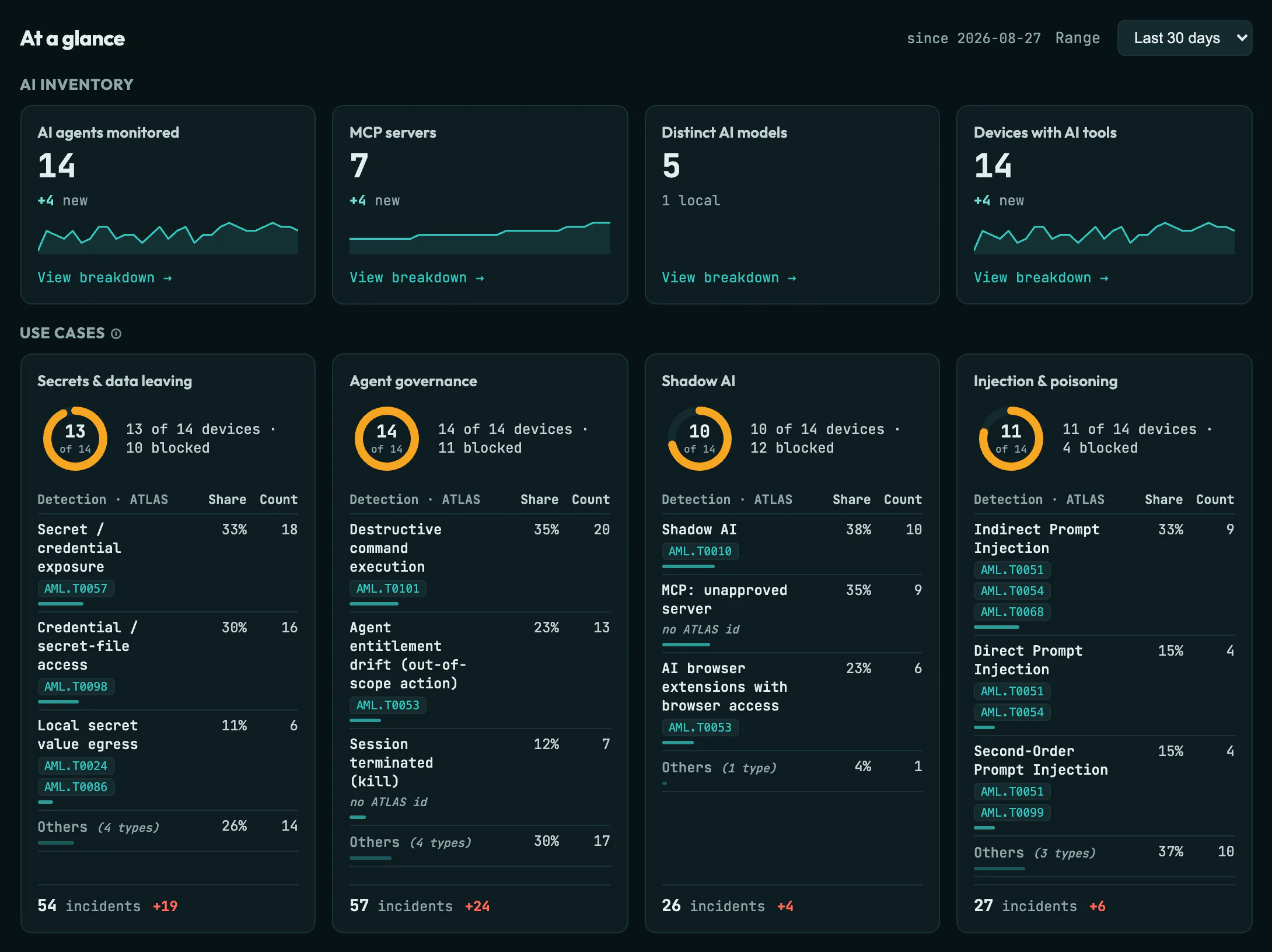
MoorAI management console, At a glance view: an AI inventory row counting AI agents, MCP servers, distinct AI models and devices with AI tools, with how many are new in the period and a daily trend line (the models card shows how many run locally instead); below it four use-case cards (secrets and data leaving, agent governance, shadow AI, injection and poisoning), each showing devices affected across the fleet, the top detection types with share, count and MITRE ATLAS technique ids, and incidents this period against the previous one.
Demo tenantThe real At a glance view, shown with synthetic demo data. Open the screenshot to inspect the details. Open full size ↗
Signed policyHuman sign-offContent-free alertsSigned evidence
01 / Deployment

Choose where your
control plane lives.

The same Management Server, hosted for you or running in your own environment.

Managed by MoorAIHosted

Let us run the console.

Use app.moorai.dev. After sign-up, the console gives you an agent installer bound to your organization.

  • No management server to install
  • Organization-bound agent installer
  • Paid service; contact us for pricing
Run it in your environmentFree self-hosted

Keep the control plane yours.

Run the same server as a Docker container in your own environment. The container is available on request.

  • Free, with no user limit
  • Deploy in your own environment
  • Source-available: Elastic License 2.0
Request a private deployment

Choose a deployment that fits your environment. Compare pricing and plans →

02 / Policy & enforcement

One signed policy for every device.

Set money movement, bulk data export, identity changes, destructive changes and hand-offs to other agents to allow, alert, ask or block. Choose fail open or fail closed per surface. Start from a preset, previewed before it applies, among them Cardholder data (PCI). Import the rules MoorAI can enforce exactly from Cisco’s Project Quarry language into a signed detector pack, after a dry run. The living-off-the-AI detections are set here too: unexpected launchers of AI CLIs, decoy keys, exposed model servers and unknown AI callers.

Every policy field →
MoorAI / ManagementExample view
Policy / Example configuration

Policy preview

Sample data
Review before applyingExample settings for an enrolled fleet
Money movementActions requiring a person’s decision
Require sign-off
Bulk data exportOutbound export actions
Block
Identity changesAccess and identity operations
Require sign-off
MCP gateway failureWhen a check cannot decide
Fail closed
Signed policyEnforced on enrolled devices
Illustrative interface, not a product screenshot. Your policy determines the configured actions; shown settings are examples.
03 / Inventory & ownership

See what each agent actually used.

The runtime AIBOM shows which agent used which model, MCP server and tool, how often and on which devices. Granted vs used compares what each agent can reach with what it used, and every agent, MCP server and AI key gets an owner. A recommendation applies as policy after a preview and never widens a list. An administrator can stop one agent session, or every agent on a device: the stop reaches the device at once through a signed stop channel, the agent process is sent SIGTERM on macOS and Linux, idle or not, and further calls and prompts of that session are denied; a Windows agent is denied but not signalled, a device whose stop watcher is not running applies the stop at its next policy fetch, about a minute, and the device’s network is not blocked. Agents started under a signed session identity are listed per device, with the person signed in at the company’s OpenID Connect provider, and can be revoked.

Sample report →
MoorAI / ManagementExample view
Inventory / Observed usage

Runtime inventory

Sample data
Claude Codedemo-device · example agent
Endpoint
Observed usageGranted vs usedOwnership
Model
Not measuredNo source measurement available
Unknown
MCP server
filesystemExample observed server
Observed
Tool
read_fileExample tool relationship
Observed
Owner
Platform engineeringExample assigned team
Assigned
Runtime AIBOMAgent → service → tool
Illustrative interface, not a product screenshot. A value no source measures is shown as not measured, never as zero.
04 / Investigation & evidence

Evidence an auditor can check.

Each agent session is one trace across the hook, the model proxy and the MCP gateway. The context tab re-verifies each record against what entered the agent’s context, alert numbering shows alerts that never arrived, and a signed evidence pack and SIEM export carry it out. Compliance mapping covers the OWASP LLM Top 10, MITRE ATLAS, NIST AI RMF, ISO 42001 and EU AI Act records.

Compliance crosswalk →
MoorAI / ManagementExample view
Investigation / Agent session

Session evidence

Sample data
Example signalCredential access
Block
Risk levelHigh
ReportingContent-free
Trace reference7ea4…9b2f
SurfaceTrace evidence
  1. Endpoint hookTool call checked
    Reported
  2. Model proxyModel request
    Reported
  3. MCP gatewaytools/call
    Reported
  4. MCP guardNo evidence received for this trace
    Not reported
Signed evidence packSIEM export
Illustrative interface, not a product screenshot. Sample signal and trace. A surface that sent nothing is listed as not reported.
05 / Your existing workflows

Alerts where your team already works.

Alerts stream to your SIEM as content-free events in JSON, Splunk HEC or CEF, with trace ids for joining. People sign in with SAML or OIDC single sign-on, and one server runs several tenants, each with its own policy. A board AI-readiness report can go out by email on a schedule.

Content-free data lineage →
MoorAI / ManagementExample view
Administration / Integrations

Delivery & access

Sample data

Connect the Management Server to your existing security and identity workflows.

SIEM deliveryJSON · Splunk HEC · CEF
Security events
Single sign-onSAML · OIDC
Identity
AIBOM exportsHTML · JSON · CSV
Reporting
Tenant policiesSeparate policy for each tenant
Governance
Supported integration typesConfigure for your environment
Illustrative interface, not a product screenshot. Shows supported formats and capabilities, not live connection status.
Before you get started

A few practical answers.

Is the self-hosted Management Server free?

Yes. Self-hosted in your own environment it is free, with no user limit, and source-available under the Elastic License 2.0. The hosted service at app.moorai.dev is paid; contact us for pricing.

What does the Management Server receive from a device?

A category, a risk level and a keyed one-way hash for each event, plus the login and hostname, which it pseudonymises on arrival. Never the prompt, the file or the matched text, unless an administrator enables a capture tier for incident investigation.

Tech specs →

See your fleet, not your prompts.

Free self-hosted, with no user limit; hosted by MoorAI, contact us. Enrolled devices enforce: block, sign-off, session kill.