Skip to content
MoorAI
Get MoorAI
// overview

Capabilities

A 85-threat matrix plus content rules, across everything the agent touches: what's typed, what it reads, what it passes to a tool, and what it says back.

// tamper resistance

Enforcement the agent can’t switch off.

Where an agent runs unattended, MoorAI’s checks sit in root-owned managed settings or in your own code, where neither the agent nor the repository it works on can turn them off. Either way the check is continuous, not a point-in-time assessment: each tool call is checked before it runs, and on a laptop, where the developer can switch MoorAI off, an enrolled device tells the console when coverage lapses.

// server mode · managed settings
Hooks a repository can’t disable
In CI and containers, MoorAI’s hooks go into Claude Code’s managed settings; the example Dockerfile writes /etc/claude-code/managed-settings.json as root and runs the agent as an unprivileged user. Claude Code ranks managed settings above user, project and local ones, and only managed settings can disable managed hooks. A settings file that tries to repoint MoorAI’s console or supply its trust keys is ignored and reported to the console as tampering, by name only.
Seen working in one live claude -p run. An Agent SDK service and a GitHub Actions run have not been watched end to end.
// agent sdk · in process
Checks your code calls, not the model
@moorai/agent-sdk hands the Claude Agent SDK the same hooks, inside your service’s process, so the model has no way to skip them. Claude Code keeps hooks the Agent SDK registers in process running even when managed settings disable every other hook. A call that would wait for sign-off is denied, because no one is there to approve it.
Some checks, the circuit breaker among them, do not run in process; each result lists what was not evaluated.
// sidecar · mcp gateway
Other agent loops, remote MCP servers
A localhost sidecar, moorai-serve, gives an OpenAI Agents SDK, LangGraph, CrewAI or custom loop the hook’s allow or deny for each tool call, from your code before the tool runs. A local gateway sits in front of remote MCP servers and, on an enforcing device, refuses an explicitly denied call instead of forwarding it.
The gateway has been run with real MCP clients (Claude Code, cursor-agent, the MCP SDK and MCP Inspector) on macOS; Claude Desktop, VS Code, Windows and Linux are untested.
// laptops · detected, not prevented
Switched off on a laptop? The console knows.
On a developer laptop the hook runs as the user, so the user, or an agent acting as the user, can remove it or weaken a setting such as bypassPermissions. That is detected, not prevented: an enrolled device sends a daily, content-free posture heartbeat, and the console flags an agent in use with no MoorAI hook traffic, a weakened setting, and a hook removed or gone stale.
Only enrolled devices send it. An unenrolled device coaches and never blocks.
// fail mode · the admin decides
When MoorAI can’t decide, the admin chose
If a check throws, runs out of time or can’t read its input, the administrator decides whether the call goes ahead or stops, separately for the coding-agent hook, the model proxy, the MCP guard and gateway, and the Inference hooks server. The choice lives in the signed policy or the root-owned machine config, never in a file the agent can write. Each fail-closed refusal raises a content-free FAIL_CLOSED alert, and the console shows every device’s effective mode, flagged when it fails open against a closed policy.
On the hook only the pre-tool check fails closed; post-tool scans, prompt checks and logging fail open. An operator-signed break-glass marker can lift a hook deny.
// evidence · alert numbering
Alerts that never arrived are counted
Each alert carries a per-device sequence number, so the console can see a gap or a counter reset. A number is taken under a per-user lock and handed out only once the new chain head is on disk, so no number is handed out twice and a crash never repeats or restarts the count. An alert that can’t get a number in time is sent unnumbered, and the console reports a run of them as its own finding.
On an unmanaged device the counters are user files: they catch an agent that deletes queued alerts, not one that also rewinds them.

How each one works →

// core controls

Built into every install.

Seven core controls, each on-device and content-free.

// agent gateway
On-device AI Agent Gateway
Every MCP tool-call passes through one on-device chokepoint (server allow-list, then per-tool argument rules, then a content scan) that makes a pass, coach, or block decision and writes a content-free, per-call audit ledger, a record you can use to prove what every agent was allowed to do. When the first malicious MCP server was caught in the wild in 2026 (postmark-mcp: 15 clean releases, then one release that quietly exfiltrated data), the control that fit was an allow-list plus argument rules plus Skill Analysis, deciding at the call: it stops a trusted server the moment it turns instead of trusting it by reputation. A scanner that vets a skill before you install it (open-source pre-install skill scanners do this) would have passed all 15 clean postmark releases; catching the 16th, the moment it turned, is the runtime layer’s job. Scan before install; enforce while it runs.
Validated end to end on Claude Code. Codex, Copilot CLI, Gemini CLI and Cursor block through their own pre-tool hooks.
// policy authoring
Natural-language policy authoring
Describe a rule in plain English and MoorAI compiles it to enforced policy, with preview-before-save. The baseline is deterministic, with no model; an optional, admin-gated AI mode (off by default) handles free-form wording and re-validates its output server-side. The on-device runtime stays content-free and model-free.
Edge, not cloud. Unlike cloud tools like Forcepoint’s ARIA, MoorAI compiles once at authoring time and enforces locally — the model never sits in the data path.
// discovery
Shadow-AI app & browser discovery
Shadow-agent discovery also enumerates installed AI desktop apps and browser extensions (ChatGPT, Claude, Copilot and more) on macOS and Windows. Content-free, feeding the AIBOM and the non-human-identity inventory.
Content-free. Read from install and config metadata only — never tokens or credentials.
// browser guard
Browser-AI coverage — MoorAI Browser Guard
A companion browser extension extends the same on-device, content-free guardrails to browser GenAI: ChatGPT, Claude, Copilot, Gemini, Perplexity, Mistral, DeepSeek and Grok on the web. It reviews a prompt locally and coaches or blocks before it’s sent, emitting only content-free signals: the category, the risk, a keyed one-way hash of the matched text and the host of the AI site it was typed into, such as chatgpt.com. It sends no device login name or hostname.
Load unpacked (Chrome / Edge). Ships as browser-ext/ in the open-source repo, not in an extension store — same content-free contract as the endpoint agent.
// pre-install gate
Pre-install skill & MCP scan
Point moorai scan at a skill, agent, or MCP config before you install it and get a verdict (clean, caution, review, or do-not-install) from the same on-device engine that enforces at runtime. Reverse shells, credential reads, poisoned MCP descriptors and injected instructions are caught in the artifact, not after it’s running. The verdict is the engine’s own enforcement decision, not an invented score.
Content-free and on-device. Findings carry a threat id, category and a keyed hash — never the matched text or your files. Runs with no enrollment; exit codes for CI.
// living off the ai
Malware using the AI already on the device
An implant can live off the AI: drive the user’s AI coding CLI from a process it injected into, call a local model server directly, or steal AI keys and call a provider itself. Four detectors answer it. An AI coding CLI started by an unexpected program (a Windows system host, an Office app, a script host, an image in a temp folder) alerts, or blocks the session by policy; a terminal or IDE counts as normal only when its name and install path match. Opt-in decoy AI keys, placed by a signed policy in new files only, are denied as Critical when used in a command or a model-proxy request. A local model server reachable without MoorAI and an unknown program calling an AI provider API (other than Gemini) are reported daily; a tool counts as known only when its executable sits in the product’s install location or, on macOS, carries the vendor’s code signature.
// forensics · trace and context
Which source carried the instruction
Every agent session is one W3C trace: each alert and allow-trail record carries a traceId and spanId, the model proxy and the MCP stdio guard send a traceparent on, a sub-agent’s records sit under the call that spawned it, and the console’s trace view draws the session’s span tree across the hook, the model proxy, the MCP gateway and guard. On Claude Code, a per-session context tree records one content-free leaf for each prompt, file read, web result, MCP result, command output and sub-agent hand-off, and every record carries the tree’s root at the moment of decision. An injection alert names the leaf that triggered it, and moorai-context-proof --verify <file> --all finds every session on the device that took in a given file, with an RFC 6962 inclusion proof. With the policy set to send leaves, the console’s context tab re-verifies each record’s root, a sub-agent’s against its own tree.
// coverage by use case

Five jobs for local-agent security, and how far MoorAI goes on each.

Each job gets a status: covered or partial.

Use caseStatusHow MoorAI handles it
Supply chainMCP servers, skills, packages Partial Every MCP server your agents call is a vendor nobody assessed, so MoorAI treats each one as a third party. moorai scan checks a skill or agent artifact on the device before you install it. MCP servers need approval to join an allow-list, and a server that changes after approval gets flagged. Rules also cover poisoned CLAUDE.md and .cursorrules files and typosquatted package names. A skill or instruction file that hides its directive from the person installing it is labelled by technique: padding, HTML comments, concealment wording, text addressed to a reviewer, or an order to write itself into the agent’s memory. Each MCP server gets a 0–100 reputation score the first time it is seen and again when its version changes, and an org can refuse servers below a minimum score. Model files can be pinned by hash: only a file whose SHA-256 an admin approved loads through an agent’s llama-server, vllm serve, ollama run or Python load without an alert, a hold or a block, by policy. The same check runs free at SkillTriage, which also publishes a catalogue of scanned MCP servers and skills.
Unintended damagethe agent runs something destructive Partial Destructive commands are coached, alerted on or blocked, depending on policy. They include commands that remove a machine’s way back: deleting shadow copies, disabling boot recovery or Windows Server Backup, and deleting Time Machine, APFS, ZFS, Timeshift, ESXi or cloud snapshots, backups and recovery points (ATT&CK T1490). The alert and block levels put a human in the loop, and a critical hit can kill the agent process instead of just denying the one call. In the model proxy, function calls are classed by name as money, bulk data, identity, destructive or delegation actions, each set to allow, alert, ask or block.
Indirect prompt injectioninstructions hidden in data the agent reads Partial Named rules for indirect and second-order injection and for invisible or obfuscated text run on the web pages, files, command output and MCP results the agent reads. An injection no rule recognises is covered by where the file came from: reading a downloaded file or a messaging-app attachment taints the session by its origin, with no content analysis, and for 30 minutes uploads, memory-file writes, MCP or skill installs, running an outside file, git push and sending messages notify, ask or block at the admin’s level. With the quarantined reader turned on, such a file reaches the agent only as a structured summary written by a separate model with no tools. When the agent writes an instruction into its own memory or instruction files (Claude Code auto-memory, CLAUDE.md, Codex AGENTS.md, Cursor, Windsurf, Cline and Copilot rules, skills) that would send data out, hide something from you, skip a check or override its rules in future sessions, MoorAI raises memory poisoning (#22), through the agent’s file tools or a shell echo >>, tee or heredoc, and runs the same check when those files load at session start. Any write into those files, by a Write or Edit, an MCP filesystem server’s write tool, or a shell copy, move, download, patch or in-place edit, also raises a content-free alert with no policy at all, which an admin can raise to ask or block. Content headed into a knowledge base or vector index raises knowledge-base poisoning (#21) when a passage addresses the AI that will retrieve it, tells it to ignore the other sources, forces an answer or carries hidden instructions; this is poisoning at retrieval time with an instruction in it, not poisoning of a model’s training data. A false fact that gives no instruction is caught two ways: a price, policy, payment or authority claim from an author the app marks untrusted or unknown is reported, held or blocked by policy, and two passages retrieved into one request that give the same product different prices, or the same payee different account numbers, raise conflicting facts (#21). A false fact from a trusted or unlabelled author, with nothing retrieved beside it to contradict it, is not detected. Ambiguous cases can go to a local model through Ollama.
Blast radiuswhat the agent can reach Partial You declare an entitlement envelope for each agent (the tools, paths and MCP servers it may use), and MoorAI alerts or blocks when the agent drifts outside it. It also flags excessive agency, and the lethal trifecta: private data, untrusted input and an outbound channel in the same agent. On Claude Code, a risky call aimed at a host, path or service the user’s own request never named is reported as outside the stated task. Task-bound tool calls go further for high-impact calls: the target of an MCP write, a payment, a role grant or any function whose name carries a write verb must be named in the request, and for a task an admin lists, only the listed tools and argument values pass.
Adoption governancewhich agents, apps and accounts are in use ✓ Covered Discovery lists the agents, AI desktop apps, browser extensions and MCP servers on each device, and marks agents as managed or unmanaged. Accounts are sorted into personal and corporate by email domain. On enrolled devices a daily check reports local model servers reachable without MoorAI and unknown programs calling AI provider APIs. Results export as an AIBOM, and fleet policy is set in the management console.
// feature checklist

What MoorAI does, row by row.

Each row is a yes, or the scope it applies to.

On-device prompt checks✓ Yes
Prompt content stays on the machine✓ Yes
Coding-agent & MCP interception✓ Yes
Blocks secrets read into agent context✓ Yes
MCP tool-call argument interception✓ Yes
Agency Enforcement (MCP allow-list · OWASP LLM06)✓ Yes
AI output review & redaction✓ Yes
Rules files (CLAUDE.md, AGENTS.md) leaving the deviceReports copies; not paraphrases
Risky actions outside the user’s stated taskReports by default; Claude Code, Codex, Cursor, Gemini CLI and Copilot CLI
MCP server reputation score✓ Yes
Instructions hidden in skill and instruction files (padding, HTML comments, concealment, reviewer-addressed text, memory persistence)Alerts; content-free labels
Agent writes to its own memory and instruction files (CLAUDE.md, AGENTS.md, rules, memory)Alerts with no policy; ask or block by policy
Files, documents and images checked with MetaDefender Cloud or VirusTotal before they reach the modelMoorAI for AI Servers; off until turned on
Session tainted by reading a downloaded file (by origin, no content analysis)Notifies by default; ask or block by policy
Outside files read only as a summary from a separate model with no toolsOff until turned on; Linux, and macOS with a pinned reader
Model files pinned by SHA-256 (llama.cpp, vLLM, Ollama, Python loads, model scans)Off until set; report, ask or block
Tool-call targets checked against the request; per-task tool and argument allowlistsReports by default; model proxy, moorai-serve, Agent SDK, hook on MCP calls
A local secret leaving encoded (base64, hex, percent, JSON-escaped, reversed, split across lines), or one the session read✓ Yes
Data uploaded to public cloud storage (S3, Azure Blob, Google Cloud Storage and seven more) or to a pre-signed URLReports by default; ask or block by policy
Another AI agent started, installed or scheduled by the agent (claude -p, codex exec, an agent CLI install, a cron or launchd run)Reports by default; ask or block by policy
A destructive command a person discusses, told apart from one they ask the agent to run✓ Yes
Command, MCP and sub-agent results scanned after they runReports; Claude Code only
Mask a secret or PII span and let the call proceedClaude Code; not yet observed live
MCP tool descriptions that ask for a credential fileReports, in the MCP proxy
Full hook enforcement on Claude Code✓ Yes
Codex / Copilot CLIBlocks via pre-tool hook; not yet validated live
OCR on pasted screenshots✓ Yes
Documents scanned before they are embedded into a vector storeAgent SDK, sidecar and MCP vector-store writes; reports by default
Custom detector packs✓ Yes
Coach / alert / block modes✓ Yes
Fail open or fail closed, chosen by the admin per surfaceHook, model proxy, MCP, Inference hooks
Business-action rules (money, bulk data, identity, destructive, delegation)Model proxy; alerts by default
Industrial / OT policy presetConsole; OT writes blocked by tool name
AI coding CLI started by an unexpected programAlerts; blocks by policy
Decoy AI keysOpt-in; use denied as Critical
Local model servers (Ollama, LM Studio, llama.cpp, vLLM) any local process can reach, or bound beyond loopbackReports, daily
Unknown programs calling AI provider APIsReports, daily; not Gemini API traffic
One W3C trace per agent session, across hook, model proxy and MCPTrace ids on alerts, records and OTel spans; the HTTP MCP gateway starts its own trace unless the client sends one
Forensic record of what entered the agent’s context (context tree)Claude Code; tamper-evident, not tamper-proof
Patient zero: every session that took in a given file, by its SHA-256Blobs of 256 bytes or more
Runtime AIBOM: which agent used which model, MCP server and toolConsole; not measured shown as such
Granted vs used, with a previewed apply-as-policyConsole; unused only where measured
Owner, purpose and approval per agent, MCP server and AI keyConsole; no directory sync
Context-aware severity (by where it's caught)✓ Yes
Content-free signals to security✓ Yes
Secrets-exposure ledger (moorai-ledger)✓ Yes
Human-override intent log✓ Yes
AIBOM export (HTML / JSON / CSV)✓ Yes
SIEM streaming (JSON / HEC / CEF)✓ Yes
Fleet AI activity timeline (console)✓ Yes
OWASP LLM Top 10 posture scorecard (console)✓ Yes
Policy coverage self-test (moorai-redteam)✓ Yes
Board AI-readiness report✓ Yes
EU AI Act usage & governance records✓ Yes
Governance without surveillance✓ Yes
Windows & Mac support✓ Yes
Opt-in process isolationSeatbelt / Job Object
Open sourceMIT
Standalone agent — no gateway✓ Yes
Account required to start✗ None
// capabilities

Prompts, files and MCP tool calls,
reviewed before the AI sees them.

Before anything an employee types reaches an AI tool, MoorAI checks it on the computer, against the rules you set. The same local engine also checks the files an agent reads into its context, the arguments it passes to MCP tools, and the answers it sends back. Anything sensitive gets flagged or stopped, and the console never receives what your people write unless an administrator turns on a capture tier.

Review on the device
Every prompt is checked locally against policy (a 85-threat matrix plus content rules) before it reaches the agent. The console never receives the prompt unless an administrator turns on a capture tier.
Coach · alert · block
Choose the response per policy, per tenant, per device. Nudge with a coaching note, raise an alert, or block the prompt outright.
Coach AI usage
Instead of a hard block, MoorAI can show an inline coaching note that points the employee toward responsible AI use at the moment of the prompt, not after the fact.
Central visibility
A web console shows posture, device inventory, alerts, and compliance — built from redacted metadata only, never prompt content.
Content-free signals
The console never receives your prompts, code or files unless an administrator turns on a capture tier. It receives which rule fired, the risk level and a keyed one-way hash (plus the login and hostname, which the console pseudonymises on arrival). Governance without surveillance.
In front of your agents
Works ahead of the AI agents your team already uses — Claude, Codex, and GitHub Copilot — as a thin local layer.
Stops secrets read into context
This guardrail covers what an agent reads, as well as what a person types. MoorAI hooks the agent's file-reading tools, so an agent pulling in a .env full of live keys is caught before that content lands in the model's context. Enforcement on Claude Code runs through its PreToolUse hook and is validated end to end. Codex, Copilot CLI, Gemini CLI and Cursor get the same deny through their own pre-tool hooks; those adapters are tested against each vendor's documented payloads and not yet against the live agents.
MCP tool-call interception
Inspects the arguments of every mcp__* tool call for secrets and PII before the call runs, and blocks per policy. The MCP surface is where agents quietly hand data to third-party servers — this is the check on that path.
Agency Enforcement
Limits what an agent is allowed to do, whatever it's told. Your approved-MCP-server list is enforced at call time (a call into a server that isn't on the list is blocked), and tool-call arguments are inspected before they run. This is the direct control for OWASP LLM06: Excessive Agency, so shadow MCP and over-reach are stopped at the call rather than found in a later review.
Actions outside the stated task
Checks a risky action against what the user actually asked for. An upload to a host the prompt never named, a destructive command or credential read on paths it never named, or an MCP write to a service it never named is reported as outside the stated task (threat #64). From each prompt a person writes, the hook keeps only device-keyed hashes of the sites, paths, service names and three labels it mentions, never the prompt. Reports by default; policy can make it ask, and a device with no account coaches. It is lexical, not semantic, so an upload to a host the user named passes. It runs on Claude Code, Codex, Cursor, Gemini CLI and Copilot CLI, whose adapters forward the prompt; the four non-Claude adapters are tested against payloads in each agent’s documented shape, not yet against the live agents.
AI output review & redaction
Reviews what the agent says back as well as what goes in. The secret detectors run on the output stage, and the claude -p CLI guard masks flagged secret spans before they're printed, so a key the agent echoes out of a config file doesn't land in a terminal log or a pasted transcript.
Rules files leaving the device
Reports the rules files an agent runs under (CLAUDE.md, AGENTS.md, GEMINI.md, and the Copilot, Cursor, Windsurf and Cline rules) when a substantial share of one shows up in what the agent writes, in a shell upload, a WebFetch or MCP arguments, or is uploaded by path, as in curl -d "$(cat CLAUDE.md)". Each file is fingerprinted on the device as keyed hashes of 7-word shingles; no text is stored. Editing the rules file itself and quoting a line or two stay silent. Report-only (threat #52). A paraphrase or translation is not matched.
Instructions hidden in a skill
Most malicious agent skills carry no code, only instructions, so they hide the instruction from the person who installs the file. Skill Analysis names each technique with its own label: padding (60 or more blank lines with content after them), an HTML comment holding a shell command, a beacon line, a URL to call or an order to the agent, concealment wording (“do not tell the user” near an exfiltration, persistence, secrets, execution or destruction action), text addressed to a reviewer or scanner telling it to pass the file, and an order to write the skill into the agent’s memory or rules files. Every rule also reads a view of the text with zero-width characters next to letters removed, Unicode tag characters decoded and blank runs collapsed, and the phrasing rules read look-alike letters folded to Latin. Findings are labels, never the matched text (threats #40, #3 and #22). They are phrasing and layout rules, so a reworded instruction can still pass.
Writes to the agent’s memory and rules
A skill that writes itself into CLAUDE.md, AGENTS.md, a rules folder or the agent’s memory steers every later session. MoorAI watches those files with no policy at all: a write raises a content-free alert, with no prompt, and an admin can make it ask or block. It reads the direct writes and the indirect ones: cp, mv, install, rsync, curl -o, wget, dd, git checkout and git restore, patch, tee, sed -i, heredocs and an MCP filesystem server’s write, edit and move tools. A command it cannot parse is held, never passed as clean. A write whose target is known only at run time (a variable, a glob, a download named by the server, an abbreviated or unknown option, a work tree or config set from the environment) raises its own alert, write-target-unknown, or is held for a decision where protected paths are declared. Part of threat #84, weakening oversight.
Files scanned before the model
In MoorAI for AI Servers, the model proxy checks every inline file, document and image a request carries with MetaDefender Cloud or VirusTotal before the request goes upstream (Anthropic, OpenAI Chat and Responses, Gemini, Ollama), and moorai-serve offers the same check at /v1/file-scan. Hash mode sends only the file’s SHA-256; upload mode is an explicit opt-in. A malicious file blocks the request or alerts, by policy; an unknown one follows its own setting: allow, ask or block. What is scanned is what is sent: a file field is read under every key case Ollama’s parser accepts (Images, IMAGES), and in enforce mode a request that repeats a JSON key or gives one field two case variants is refused rather than guessed at. Scanning is off until an admin turns it on, and keys come only from the server’s admin binding, key file or environment.
Files from outside taint the session
A document from a browser download or a messaging app can carry an injection no detector recognises, so MoorAI judges it by where it came from. A file counts as outside when it carries the macOS quarantine mark or download record, a Windows Zone.Identifier for the Internet or an untrusted zone, or sits in the download folder. When the agent reads one (a Read, cat, textutil or pandoc, an MCP filesystem read), unpacks an outside archive or runs an outside file, the session is tainted for 30 minutes, with no content analysis. In that window six actions take the admin’s level, each set on its own: an upload or other outbound transfer, a write to a memory or instruction file, adding an MCP server or installing a skill or plugin, running an outside file, git push, and sending a message. Notify is the default; ask and block are policy settings. Removing an origin mark (xattr -d com.apple.quarantine, Unblock-File) raises an alert every time. Alerts name the source kind, the app and a keyed host hash, never a path or a host (threat #3). On Linux, the download folder is the signal.
Quarantined reader
Off until an admin sets fileQuarantine. Then a file from outside reaches the agent only as a structured summary: a separate model with no tools, local unless the admin allows otherwise, reads it and returns the document type, a short summary, key facts and any text aimed at an AI, framed as untrusted data. A Read is pointed at the summary; other reads are refused with the summary in the reason. Every detector runs over the summary, and one that carries an injection is withheld. Under "ask" the person can still approve the raw file. The reader runs under its own OS account on Linux; on macOS the admin pins a same-user reader by executable path and code-signing Team ID. MoorAI checks which process accepted the connection before it sends anything. Each read raises one content-free alert with its outcome (threat #3). Origin taint stays on, since a summary is still model-written text.
Model files pinned by hash
The admin lists the SHA-256 of each approved model file (modelPins) and picks report, ask or block (modelPinMode), in the signed policy or the root-owned machine config, never a user file. An agent’s llama-server -m and the other llama.cpp tools, vllm serve, ollama run and ollama create, and Python loads of a local path in the command’s own code (torch.load, pickle, joblib, np.load, load_model, from_pretrained) are checked before they run; an Ollama blob is checked against its own hash, never its name. The download scan and the store scan mark every unpinned file not-approved, and a pin never overrides a static finding. A file too large to hash in time is asked or denied by mode, never allowed silently. Alerts carry the load kind, format, a size class and the first 12 hex of the hash, never a path or a model name (threat #76). A pin proves which file runs; task-bound tool calls check what it then does.
Tool calls bound to the task
Two deterministic checks of a tool call against the person’s request, with no model guarding a model. Object check: for a high-impact call (an MCP write, a money, identity, bulk-data, destructive or delegation function, a function whose name carries a write verb, or any tool the policy’s intentArgs names), the call’s target must be named in the request. Under “cut the apple”, cut(target: "apple") passes and cut(target: "hand") is object-not-in-task; it reports by default, and policy can ask or block. Task allowlists: when a session’s task matches an entry, by keywords or a task id the service sets, only the tools and argument values it lists pass (exact values, globs, numbers or ranges), an unlisted argument is denied, and anything else is held at the entry’s deny or ask. An entry that cannot be read denies what it would have covered and raises an alert. Runs in the model proxy, moorai-serve, the Agent SDK and the endpoint hook on MCP calls. The task itself is never stored, only keyed hashes of its words, and alerts carry no argument (threat #64). It matches words, not meaning.
Encoded secrets, and secrets the session read
MoorAI fingerprints your local secret values (.env, cloud credentials) on the device as keyed one-way hashes and blocks an outbound command or tool call that carries one, verbatim or encoded: base64 or base64url, padded or not and alone or inside a larger blob, hex, percent-encoded, JSON-escaped, reversed or wrapped across lines. A secret the agent reads during the session, a provider token in a file, a command’s output or an MCP result, or a KEY=value line of a credential file, joins the check for the session-risk window (30 minutes by default). When MoorAI cannot be sure it saw every secret, the call is an unverified match that secretEgress.unverified decides: ask by default, or block or report; on a host with no one to approve, ask becomes deny. Only the hash prefix, the encoding and the source kind leave the device. Encryption, compression and custom encodings are not covered.
Uploads to public cloud storage
Anyone holding a bucket or a signed URL reads back what lands there, so a bucket the agent picked itself is an exfiltration drop. MoorAI flags curl, wget or Invoke-WebRequest sending a body, -T or a non-GET method to a public object-storage endpoint (Amazon S3, Azure Blob, Google Cloud Storage, Alibaba OSS, Cloudflare R2, Tencent COS, Huawei OBS, DigitalOcean Spaces, Backblaze B2 or Wasabi), matched by the provider’s own endpoint naming rather than the bucket name, or to a pre-signed URL on any host (X-Amz-Signature, OSSAccessKeyId, an Azure SAS sig=, X-Goog-Signature). Uploading to your own bucket is ordinary work, so it reports by default; a policy can ask or block (threatPolicy["86"]), and that setting applies to every bucket, your own included. A download, signed or not, is not an upload. Uploads through scp or rsync, or through the providers’ own CLIs (aws s3 cp, gsutil cp, az storage blob upload, rclone), are outside this rule (threat #86; ATT&CK T1567.002, partial).
Agents that start other agents
An agent started from a shell runs with its own permissions and none of the parent’s approvals, and a scheduled one keeps running after the session ends. MoorAI flags a shell command in which the agent starts another AI agent in its non-interactive form (claude -p, codex exec, gemini -p, aider --message, cursor-agent -p, opencode run, goose run, also through npx or uvx), installs an agent CLI (a global npm install, pip, pipx, uv, brew, winget, or a vendor install script that is run), or schedules one through cron, launchd, systemd, at or a Windows scheduled task. It reads the command the way the shell runs it, so a name in a commit message, a README or a fetched page is not a launch, and --help and --version never are. The agent’s own sub-agent feature is tracked separately. It reports by default; a policy can ask or block (threatPolicy["88"]).
Tool results, scanned after they run
What comes back into the agent is untrusted input. On Claude Code, MoorAI scans command output, MCP responses, sub-agent reports and fetched pages as inbound content, for indirect prompt injection and secrets spilling into context, within a 64 KB window. The tool has already run, so a finding reports and tells the model to treat the output as data; it cannot un-run the call. On 1,041 benign outputs (corpus samples, real command output and node_modules files) it alerts on 148 and blocks none; 45 of 87 attacks alert, measured in-sample. It adds one hook process per Bash, MCP or sub-agent call, about 82 ms at p50. PowerShell output is scanned the same way as Bash output, and the other agents’ adapters forward only web results.
Mask instead of block
For secrets, personal data and regulated data, a policy can mask: MoorAI replaces the matched span with a placeholder such as [MOORAI:secret:…], derived from a keyed hash so no part of the value survives, re-scans the rewritten call and lets it proceed. It rewrites Claude Code tool inputs (a command, file content, MCP arguments, a sub-agent prompt) and tool results, and never auto-approves a call. Where it cannot rewrite — a Read, the other agents’ adapters, a device with no account — the policy’s fallback applies. Masking is built from Claude Code’s hooks reference and has not yet been observed in a live session.
Is it protecting this machine, and why?
moorai-doctor checks, read-only, whether MoorAI is actually protecting a machine: its hook registration in Claude Code, Codex, Cursor, Gemini and Copilot, Claude Code managed settings that can switch hooks off, enrollment, which policy is enforced and whether its signature verifies, and a live self-test of the real hook. moorai-explain answers “why did MoorAI flag this?” for any string: each finding, the policy action, the final decision and the safer alternative, locally. Step by step in the quick start.
Provider-anchored secrets engine
Around 14 provider-anchored detector families — GitHub, GitLab, Slack, Stripe, AWS, Google, OpenAI/Anthropic, npm, PyPI, SendGrid, Twilio, Azure, GCP service-account keys, database connection strings — plus Shannon-entropy scoring for the keys no pattern knows about.
Tuned against false positives
False-positive blocks are the fastest way to kill a guardrail's credibility. The entropy gate ships with a benign-shape allowlist (UUIDs, git SHAs, base64 and data-URIs, ISO timestamps, obvious placeholders), so high-entropy strings that clearly aren't credentials don't stop anyone's work. Measured: 3.32% of benign developer prompts flagged (20 of 602), at 86.4% recall on a locked held-out attack set. The full accuracy table.
Custom detector packs
Ship your own patterns — internal project codenames, customer-ID formats, contract numbers — as data from the policy server. Packs are compiled and ReDoS-guarded on-device, so a bad pattern can't hang the endpoint. No agent rebuild, no redeploy.
OCR on pasted screenshots
A screenshot of a credentials page is still a credentials page. Text is extracted using your operating system's built-in recognition: on macOS that's the system Vision engine, so the image never leaves the machine and no model is bundled. This runs in the MoorAI desktop app. Where the OS provides no text recognition, the app can send the image to Anthropic’s API with an Anthropic API key already on the device, never to MoorAI. Either way the extracted text runs through the same PII and secret policy as typed text, closing the copy-paste-a-screenshot workaround.
Index & RAG payload inspection
A poisoned document in a vector store is read back into a later user’s context with no tool call, so MoorAI scans documents before they are embedded. There are three ways in: scanBeforeEmbed(chunks) and guardEmbed(embedFn) in the Agent SDK for an app that runs its own ingestion, POST /v1/index-scan on the local sidecar for any framework, and the MCP proxy and gateway, which scan the document arguments of vector-store write tools before the server sees them. The write tools were read from each server’s source: Chroma’s add and update documents, Qdrant’s qdrant-store, Pinecone’s upsert-records, Weaviate’s insert and upsert, mem0 and OpenMemory’s add and update memory, Milvus’s insert, the OpenSearch memory tools, Redis’s set_vector_in_hash, LanceDB’s ingest_docs, and the MCP memory server’s create_entities, create_relations and add_observations. Run against the real Chroma and Qdrant MCP servers under a blocking policy, a poisoned document was refused and never stored. It reports by default and blocks when policy says so. An HTML comment carrying a system: directive is the kind of delayed hijack this catches. An app that embeds without calling MoorAI, or an in-process vector library with no MCP or API hook, is not covered.
AIBOM — AI bill of materials
An exportable, content-free inventory of every AI provider, model (cloud and local), agent CLI, MCP server — with its capability scope and risk level — and shadow-AI app across the fleet. HTML, JSON, or CSV, with a CycloneDX-loose components[] shape for GRC, audits, and third-party risk reviews.
EU AI Act usage & governance records
An append-only governance trail (who changed which policy and when) alongside usage-by-category, prompt outcomes, and policy state, date-windowed and exportable. Records and evidence to support your AI Act obligations; MoorAI does not certify compliance, and this is not legal advice.
Board AI-readiness report
Fleet trust score, posture distribution, shadow-AI exposure, a worst-first list of device scores, and rule-derived recommendations. Print to PDF for the board pack, or schedule it monthly or quarterly by email.
Automatic PII reporting
Which data classes — PII, PHI, secrets, source, regulated — moved via which agent, on which device, over any window you pick. Exports as HTML, JSON, or CSV, and stays content-free: the classes and counts, never the records themselves.
SIEM streaming
Push alert events to your SIEM in real time as generic JSON, Splunk HEC, or CEF, still content-free. The connector is SSRF-guarded (https only, private, loopback and cloud-metadata hosts refused) and the token is encrypted at rest.
Windows and macOS
A native Windows agent ships alongside macOS, with an NSIS installer built in CI and its own native CI check. The installer carries the in-app auto-updater’s signature and no Authenticode code-signing signature. Opt-in process isolation on both: a Windows Job Object (kill-on-close so no agent process is orphaned, clipboard read/write denial to shut a silent exfil channel, USER-handle denial, and an active-process cap) and a Seatbelt sandbox on macOS.
Community agent
Runs on macOS, Windows and Linux with no account required and coaches: it shows what it flagged and the safer way. Enrolled in a MoorAI console (free self-hosted, no user limit), it enforces your policy. Open source under MIT — the signed installers are built in the open by CI.
Native host + webview core
Built in Rust with a Tauri native host and a webview detection core — a small, local footprint on the machine it protects.
Fleet management
A separate management server, source-available under the Elastic License 2.0, adds a multi-tenant console, SSO, and compliance reporting across a whole fleet of devices.
Privacy-preserving DLP
Governance and data-loss protection for AI agents that keeps content on-device — the difference from cloud DLP is that nothing has to leave the machine.
Acceptable-use guardrails
Keep AI use professional. On-device content rules flag not-safe-for-work material — explicit, harassment, hate, violence — in both prompts and AI responses, in English and Hebrew. Sexual, violent and profane content is reported and coached by default, and never blocked unless an org sets that category to require a justification or to block; harassment, hate and the other categories run once an org turns them on.
Govern agents, tools & MCP
Allow or deny which agent CLIs and MCP servers each policy permits; the MCP allow-list is enforced at call time, not merely reported. Set a default action per data class (PII, secrets, source, regulated) and require a logged justification to proceed — per tenant, per device.
MCP server reputation
Scores each MCP server from 0 to 100 the first time it is seen and again when its version changes: a name typosquatting a popular server, an unpinned version, install scripts in the copy npx already installed, poisoned tool descriptions. Scoring is offline; a registry lookup and the published verdicts of SkillTriage, MoorAI’s free scanner, are opt-in in the MCP proxy. A server below “good” raises a content-free alert (score, band and reason codes), and an org can refuse servers below a minimum score on enrolled devices. The score also appears in the AIBOM and the shadow-AI inventory. It rates where a server comes from, not what it does at runtime; tool listings and results are scanned separately.
Trust score & AI-asset inventory
A composite device trust score rolls up alert history, shadow-AI exposure, and endpoint posture. Beside it sits a per-device AI-asset inventory — models and providers, agent CLIs, local runtimes like Ollama and LM Studio — read from config metadata only, never tokens or credential vaults. Each MCP server is scored by capability scope: network, filesystem, credential access, derived from its launch config and env var keys, never their values.
// central visibility

One view of the fleet’s AI use.

The console’s At a glance view counts the AI agents, MCP servers, models and devices in use, with what’s new in the period. Four use-case cards show the share of the fleet affected, the top detections with share, count and MITRE ATLAS id, and incidents against the previous period, over the last 7, 30 or 90 days.
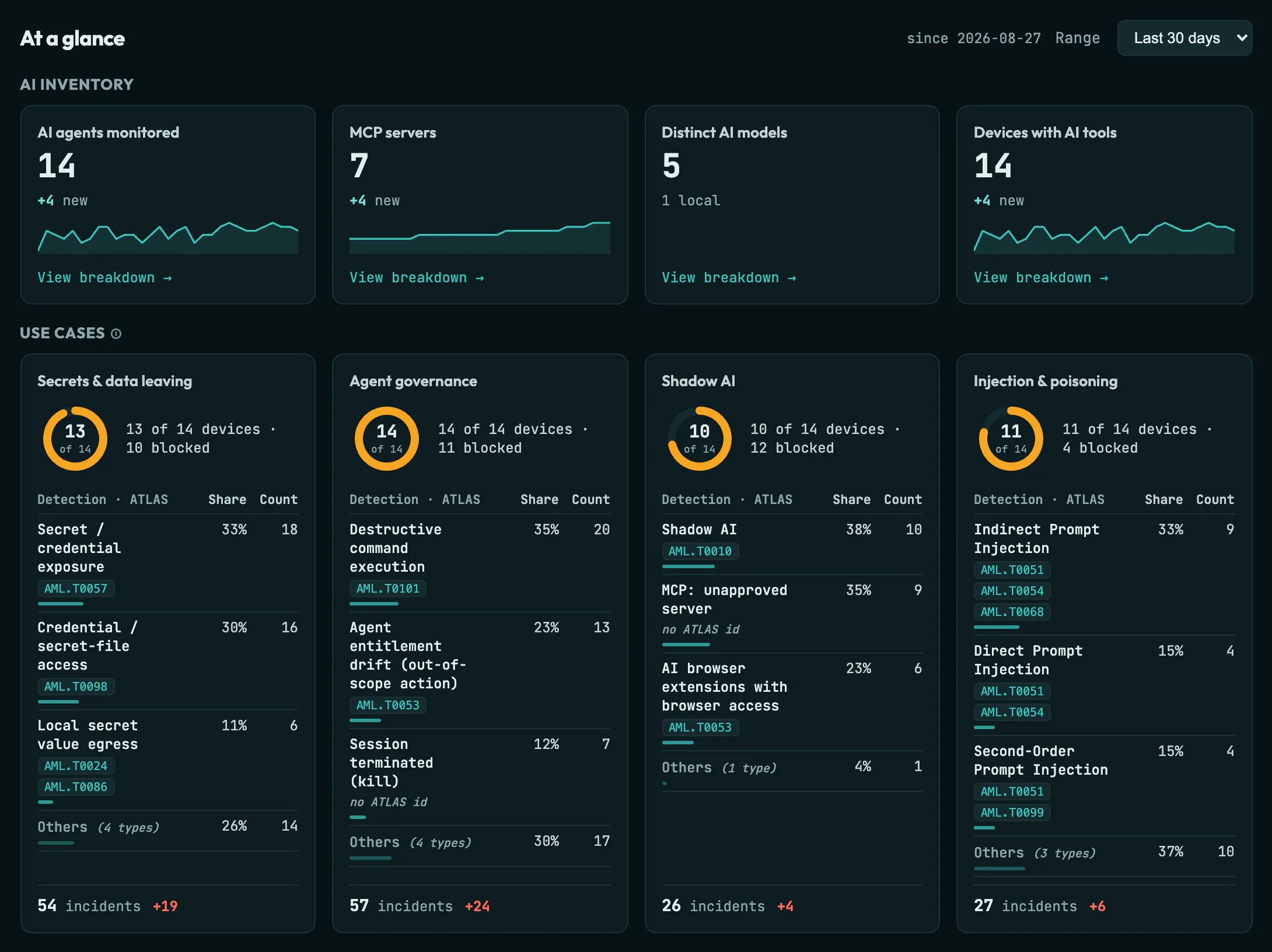
MoorAI management console, At a glance view: an AI inventory row counting AI agents, MCP servers, distinct AI models and devices with AI tools, with how many are new in the period and a daily trend line (the models card shows how many run locally instead); below it four use-case cards (secrets and data leaving, agent governance, shadow AI, injection and poisoning), each showing devices affected across the fleet, the top detection types with share, count and MITRE ATLAS technique ids, and incidents this period against the previous one.
Demo tenantDemo tenant, synthetic data. No prompt content reaches the console; its counts come from content-free signals. Open full size ↗
// compliance & regulation

Mapped to the frameworks auditors ask about.

MoorAI maps its threat model and content-free telemetry to these frameworks, and rolls it into a board-ready readiness report and an on-device AIBOM for the EU AI Act. The answer to “how do you govern AI use?” comes with evidence drawn from redacted signals, never from what anyone typed.

Threat coverage
OWASP LLM Top 10
Prompt injection, sensitive-information disclosure, insecure output, excessive agency — mapped to the categories.
Adversary techniques
MITRE ATLAS
Detections aligned to the ATLAS techniques for adversarial AI — ATT&CK, for AI.
Risk management
NIST AI RMF
Govern · map · measure · manage — mapped per tenant from redacted signals.
Management system
ISO/IEC 42001
AI management-system controls, reportable across the fleet.
Assurance
SOC 2 · ISO 27001
Control-mapping reports that feed your existing audit programs.
Regulation
EU AI Act-aware
Usage governance and records that support emerging AI-Act obligations.
EU AI Act
AIBOM — your AI bill of materials →
Generate a content-free inventory of the models, agents, and MCP servers in use — built on the device from config metadata, for your EU AI Act records. Read the guide →
// board-ready

An AI-readiness report
your board can read.

MoorAI rolls its content-free telemetry into a single board-level report: a composite trust score, shadow-AI exposure, endpoint posture, framework control-mapping, and a data-lineage-by-agent trail. All of it is built from redacted signals, never prompt content.

See the full layout — composite score, framework-mapping summary, and a data-lineage-by-agent table — rendered with example data.

// start here · shadow-agent discovery

Discover the shadow agents already on your dev laptops.

You almost certainly have unmanaged Claude Code, Cursor, and Copilot installs running on developer machines, and no visibility into what they read, send, or exfiltrate. MoorAI inventories every AI agent, app, account, MCP server, and browser extension on each device from redacted, content-free signals, then lets you govern them: which agents and MCP servers are approved, and what each is allowed to do.

Personal vs corporate
Agent accounts
Which account each AI agent (Claude Code, Codex, Copilot CLI) is signed in as — accounts on non-corporate domains flagged as personal. Never the token, only the identity.
Unmanaged tools
AI apps & CLIs
ChatGPT, Claude, Cursor, Ollama, LM Studio and the agent CLIs installed on the device — sanctioned or not.
Agent posture
MCP servers
The Model Context Protocol servers each agent has wired up — local, container, or remote — with unapproved ones flagged against policy.
Browser reach
AI extensions
AI browser extensions across Chrome, Edge, Brave, Firefox and Safari — and which can read the pages you visit.

Review it
on the device.

Coach, alert, or block — before the prompt reaches the agent.

Community agent on GitHub Read the docs ↗